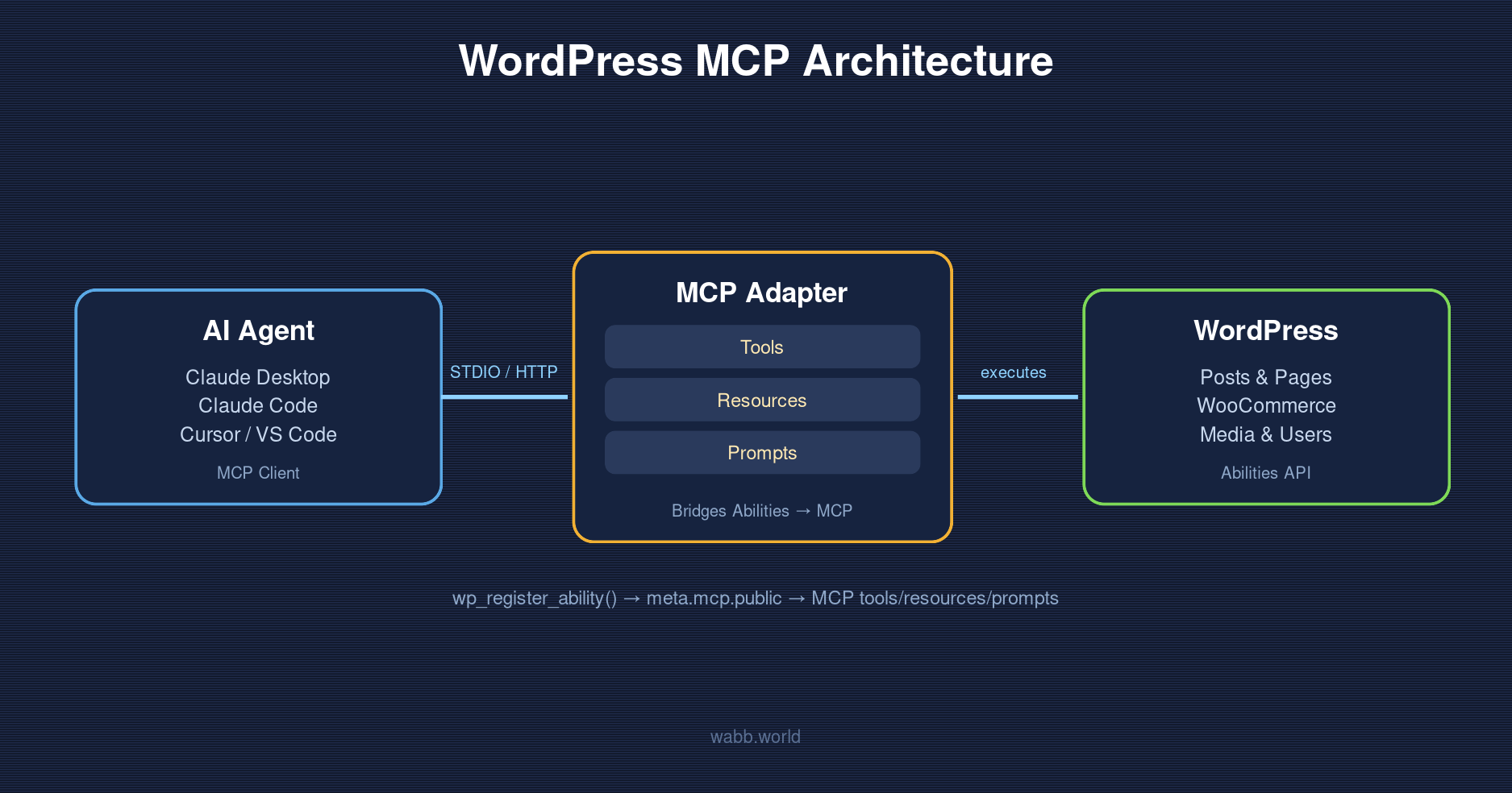
The Model Context Protocol (MCP) is an open standard that lets AI agents like Claude connect to and interact with external systems in a structured way. WordPress now officially supports MCP through a package called the WordPress MCP Adapter. This post covers what WordPress MCP means, how it works under the hood, real-world use cases, and how to start building your own MCP-ready plugin.
What Is WordPress MCP?
WordPress MCP isn’t a single plugin — it’s an ecosystem built on two main pieces: the Abilities API, introduced in WordPress 6.9, and the MCP Adapter, the official package under the AI Building Blocks for WordPress initiative.
- The Abilities API lets WordPress core and plugins register named “abilities” with typed input/output schemas, a
permission_callbackfor authorization, and anexecute_callbackthat runs the actual logic. - The MCP Adapter converts those abilities into MCP tools, resources, and prompts that AI clients can discover and call directly.
In short: if your site already registers abilities, you’re one step away from letting an AI agent like Claude Desktop, Claude Code, Cursor, or VS Code use them through MCP.
How It Works
MCP organizes interactions into three main primitives:
- Tools — executable functions the AI calls to perform actions, like creating a post, updating data, or running diagnostics.
- Resources — read-only data sources the AI can reference for context, such as a log file or site configuration.
- Prompts — pre-configured templates that guide the AI through specific workflows.
Once the MCP Adapter plugin is installed and active, it automatically registers a default MCP server along with three gateway abilities: mcp-adapter-discover-abilities (list what’s available), mcp-adapter-get-ability-info (get details on an ability), and mcp-adapter-execute-ability (run it).
Two transport methods are supported: STDIO via WP-CLI, ideal for local development, and HTTP via the @automattic/mcp-wordpress-remote proxy package, which authenticates using WordPress Application Passwords — better suited for live, publicly accessible sites.
Real-World Use Cases
Once MCP is connected, teams are already using it for:
- Writing and publishing content directly through conversation with an AI
- Managing WooCommerce products and orders
- Running bulk data operations
- Managing multiple sites at once for agencies
Building an Ability and Exposing It Through MCP
Start by registering an ability with wp_register_ability(), then add the meta.mcp.public flag set to true so the default MCP server can discover and execute it.
add_action( 'wp_abilities_api_init', function() {
    wp_register_ability( 'my-plugin/get-posts', [
        'label'       => 'Get Posts',
        'description' => 'Retrieve WordPress posts with optional filtering',
        'category'    => 'site',
        'input_schema' => [
            'type' => 'object',
            'properties' => [
                'numberposts' => [ 'type' => 'integer', 'default' => 5 ],
                'post_status' => [ 'type' => 'string', 'enum' => ['publish','draft'] ],
            ],
        ],
        'execute_callback' => function( $input ) {
            return get_posts( $input );
        },
        'permission_callback' => function() {
            return current_user_can( 'read' );
        },
        'meta' => [
            'mcp' => [ 'public' => true ],
        ],
    ] );
} );
That’s it — an AI agent can now discover this ability via discover-abilities and call it via execute-ability.
Creating a Custom MCP Server for Your Plugin
For more control — for example, exposing only specific abilities under a server dedicated to your plugin — install the package via Composer and register your own server.
composer require wordpress/mcp-adapteradd_action( 'mcp_adapter_init', function( $adapter ) {
$adapter->create_server(
'my-server-id',
'my-namespace',
'mcp',
'My MCP Server',
'Description of my server',
'v1.0.0',
[ \WP\MCP\Transport\HttpTransport::class ],
\WP\MCP\Infrastructure\ErrorHandling\ErrorLogMcpErrorHandler::class,
\WP\MCP\Infrastructure\Observability\NullMcpObservabilityHandler::class,
[ 'my-plugin/get-posts' ], // abilities to expose as tools
[],
[]
);
} );With this approach, you don’t need the meta.mcp.public flag, since the abilities exposed are explicitly listed when the server is created.
Security Considerations
Because MCP clients act as logged-in WordPress users, treat them as part of your application’s attack surface and follow these practices:
- Always scope
permission_callbackto the minimum required capability; avoid__return_truefor destructive abilities. - Use a dedicated, limited-capability user account for MCP access instead of a main admin account.
- For MCP endpoints exposed publicly over HTTP, favor read-only abilities.
- Consider custom authentication beyond Application Passwords for higher-security environments.
- Log and monitor MCP tool usage with custom observability handlers.
Conclusion
WordPress MCP is a major step toward making WordPress a platform AI agents can understand and operate in a standardized way. With the Abilities API as the foundation and the MCP Adapter as the bridge to the MCP specification, developers who already use the Abilities API need very little extra code to make their plugins AI-ready. Start with non-destructive, read-only abilities, test with AI clients like Claude Desktop or Cursor, and gradually expand to more complex workflows as your security setup matures.
Leave a Reply